Every per-point map on a selection in one list — skin, deformer, blend shape, nCloth. Transfer by closest point between different meshes.
For Autodesk Maya 2024 to 2027
Every tool costs two dollars.
tdToolKit is a dockable tool box for Maya. It starts with a shelf that works the way a shelf should — import the shelves you already have, drag buttons into place, give them your own colors, and theme the whole box to match.
Two dollars for the base package. Two dollars for every tool you add. Nothing to subscribe to.
Nothing to install beyond Maya, and nothing written into your scene files.
Buy only what you need
The base package is the tool box, the Shelf, the Canvas, the Theme Editor and Selection Info. Every other tool is a separate two dollars.
Bundles cost less
Take a discipline's tools together — rigging, animation, pipeline — or take the lot, and pay less than the parts.
Yours once you buy it
One payment per tool, and no subscription. No key to enter and nothing to activate: unzip it and it works, on every machine you use, online or not.
The Shelf
Bring the shelf you already have.
Import the shelves you already use, straight from Maya or from a shelf file somebody sent you. Icons, labels, commands, tooltips and right-click menus all come across, and your commands run exactly as they did before. Nothing to rebuild by hand.
- Drag buttons into place, band-select a group and move them together.
- A click command, a double-click command and right-click items, each in Python or MEL.
- Label and button colors per button, or a theme token so they follow the theme.
- Custom widget buttons: a snippet of Python returning any Qt widget — a slider, sitting on your shelf.
Pick a theme, or make your own.
The whole box restyles — every tool, every button, every dock. The Theme Editor edits the live palette with color pickers, and the UI changes as you drag. Any one tool can wear a different theme from the rest.
Maya Dark
Light
Citrus
Hacker
Amethyst
Autumn
Mint
Chalk
Denim
Slate
Layouts that remember more than window positions
Save an arrangement under a name and it keeps the tools that were open, how they were docked, what each tool was set to, the extra windows, and the theme you were wearing. A rigging layout and a lookdev layout can each come up in their own.
Save one, send it to somebody, and their Maya comes up looking like yours.
The Canvas holds other tools
Put a group of tools inside a Canvas and they move as one — dock it, float it, hide it, and everything inside goes with it. Canvases can hold other canvases.
A Canvas can also leave the tool box entirely and become a Maya panel of its own, docking anywhere Maya’s own panels go.
Add a tool whenever you want one
All tools and bundlesOutliner
$2A fresh take on the Outliner: drawn in your theme, with Maya's own icons, and packed with the things you keep wishing Maya's had.
FBX I/O
$2FBX in and out: options laid out readably, every take of a file onto one rig, clips combined into one, and a plain-words look inside any file.
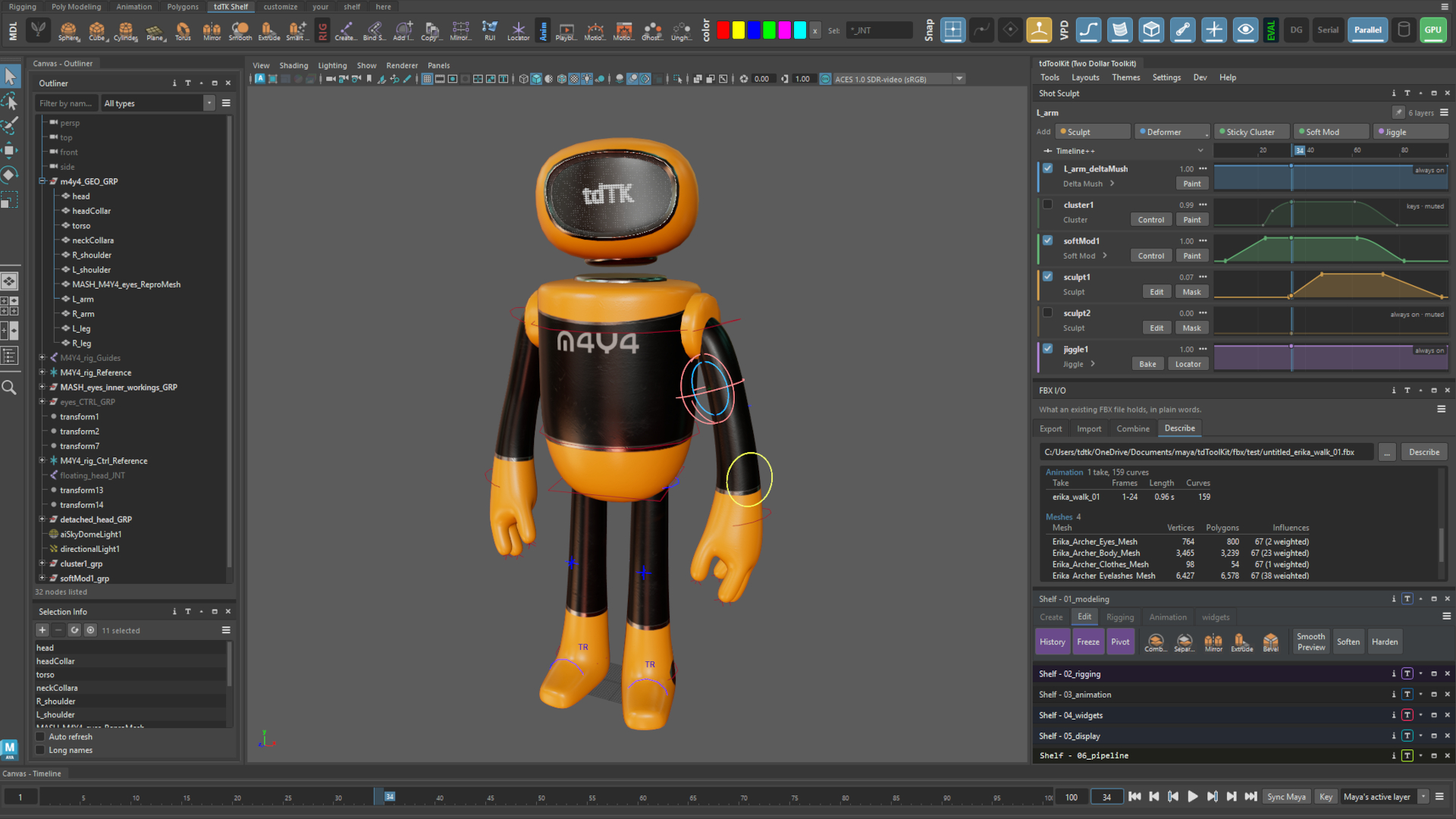
Per-shot corrective layers — in-place sculpts, sticky clusters, soft mods and jiggle, each with its weight over time on a track.
Nothing to installNo extra downloads. Unzip it, restart Maya, it is there.
No script nodesThe tool box stores nothing in your scene.
Maya 2024 to 2027Tested on all four, on Windows.
Free updatesEvery fix and improvement to a tool you own.
Community
Everything you make is a file you can hand over.
A shelf, a theme, a single button: each one exports as a file in a click. The library is where people put the ones worth keeping, so you can take somebody else's rigging shelf and be using it this afternoon.
Take a whole shelf
A shelf brings every tab, section and button with it, commands and icons intact.
Or just one button
A single button or widget exports on its own, so you can send one without the shelf around it.
Read it before you run it
Shelf buttons are code. A theme is not, and nothing in one runs.
Who we are
A small shop. Built for the people who use Maya all day, ourselves included.
Two dollars is the point
We would rather a lot of people use these tools than charge a few people a lot. Every tool is priced so that buying it is easier than thinking about it.
Still being built
New add-ons are in progress, and the ones here keep getting better. Updates to a tool you own are free. We post new tools and work in progress on our social accounts.
We answer our mail
Bug reports and questions go to support@twodollartools.com. Small enough to read all of it, and to fix what is broken.
Tell us what to build
Most of what is here started as something we needed ourselves. If you need a tool, say so — that is how the list grows.
Start with the base package.
The tool box, the Shelf, the Canvas, the Theme Editor and Selection Info — two dollars, once.