Shelf
Imports your Maya shelves. Drag to arrange, style per button, and put live widgets among the icons.
Tools / The base package
The tool box itself: one panel in Maya that your tools dock inside, with layouts, themes and settings of its own. It comes with a shelf, a canvas, a theme editor and a selection readout, and every add-on plugs into it.
Start here Everything else needs it
Tools tab, stack, sit side by side, float and come back. Every tool draws its own title bar in the theme, so a floated tool still looks like part of the set and drags back in by that bar. Collapse a tool to only its title bar and its neighbors take the room.
Save an arrangement under a name. It keeps which tools were open, how they were docked, what each tool was set to, the extra windows and canvases, and the theme. A rigging layout and an animation layout are one menu pick apart.
The arrangement saves itself a moment after every change, and Maya starts back into what you left. Loading a layout warns you first if you have rearranged anything since your last save.
Pick a theme and the whole box changes with it: every tool, every button, every dock. Start from a built-in one and make your own in the Theme Editor. Any single tool can wear a different theme from the rest, from a button on its title bar.
Layouts and themes export as files. A settings bundle packs every layout, theme, shelf and tool setting into one file a colleague imports, so a team can share one workspace.
Unzip an add-on and it is in the Tools menu next time Maya starts, listed under what it is for. It docks, themes and saves with layouts like the tools that came in the box.
Everything the tool box does for itself is in the menus along its top. Each tool keeps its own options in a menu of its own, on the tool.
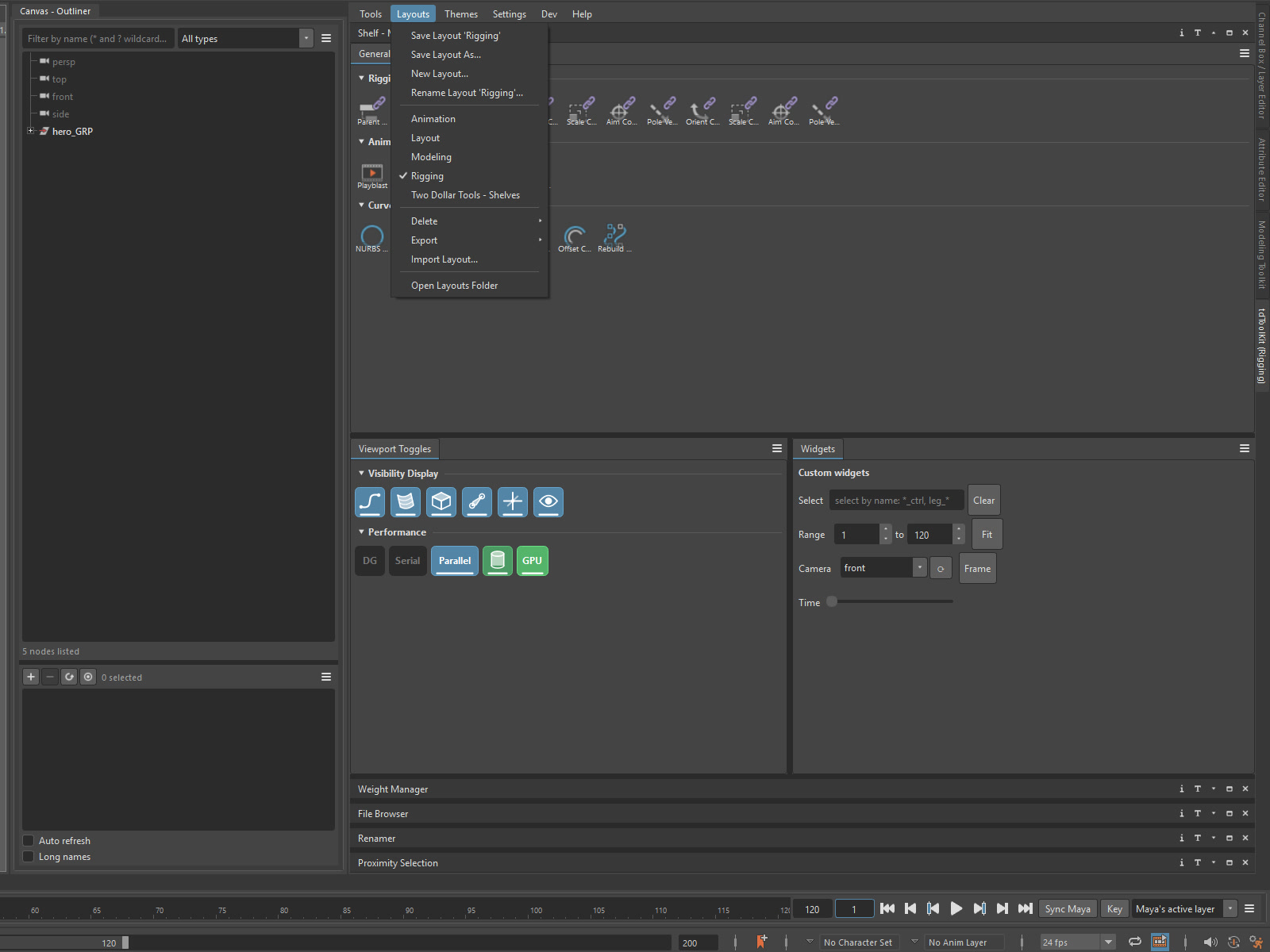
| Tools | Open and close tools, grouped by what they are for. A closed tool keeps its state. The Shelf, the Canvas and the Outliner can open extra windows of themselves. Clear All closes every tool, and Close All puts the whole tool box away. |
|---|---|
| Layouts | Save Layout, Save Layout As and New Layout, then load, delete, export or import. The layout you are on is ticked in the list and named on the tool box's tab. |
| Themes | Switch between the built-in themes and your own, open the Theme Editor, and export or import a theme. |
| Settings | Which tools open at startup, whether the last layout comes back, ignoring the mouse wheel over number fields, version numbers on title bars, locking canvas editing, the settings bundle, and a shortcut to your user folder. |
| Dev | Reload the tools, and see why a tool failed to load. Mostly for people writing tools of their own. |
Imports your Maya shelves. Drag to arrange, style per button, and put live widgets among the icons.
Group tools into one unit that moves together, or push it out as a Maya panel of its own.
Edit the live palette. The interface changes as you drag a color.
A small list of what is selected, and a quicker way to isolate it.
After the restart there is a new tdToolKit shelf with one button on it. Press it and the tool box opens, docked beside the Attribute Editor to start with — drag its tab to put it wherever suits you. Maya brings it back the next time it starts, with your last layout. The button is put there once, so if you move it or throw it away, it stays that way.
It restyles and arranges the tools inside it, not Maya. Maya's own panels look and dock as they always have.
| Price | $2, one payment |
|---|---|
| Includes | The tool box, Shelf, Canvas, Theme Editor and Selection Info |
| Maya | 2024 to 2027, Windows |
| Install | Unzip into your Maya modules folder, restart Maya — how to install |
| Files | Layouts, themes, shelves and settings are saved in your own Maya folder |
| Scene files | Writes nothing into your scene |
Bought once, yours to keep, updates included. Add tools whenever you want one.